
London · Web project for founders, consultants, creators and personal brands
“A personal brand site should do more than look good. It should take the booking, send the invoice and put the call in the diary.”
Ariel Brettell describes himself as a global connector, founder and operator, working with founders and brands across the US, the UK, Europe and the Middle East. SwainUK rebuilt arielbrettell.com in July 2026 as a personal brand website with a full booking system behind it: paid sessions, calendar and Google Meet automation, client accounts, a portfolio that fills itself from YouTube, and a journal. This case study explains how it fits together and what any consultant or creator can borrow for their own site.
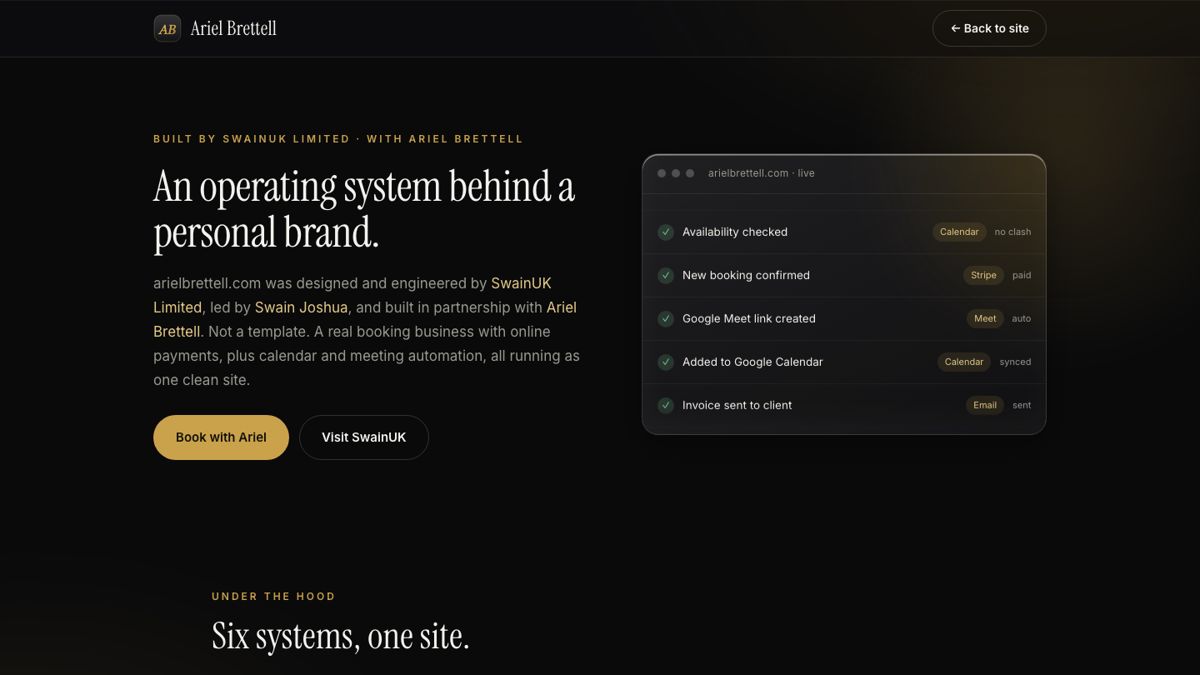
An operating system behind a personal brand
01 · The brief
From link-in-bio to a booking business
Many personal brands run on a link-in-bio page, a calendar link and a payment link that live in three different places. Every booking then means emails back and forth: is this time free, here is the invoice, here is the meeting link. The brief for arielbrettell.com was to put all of that behind one clean site, so a visitor can go from reading about Ariel to a confirmed, paid call without anyone typing an email.
| Part of the site | What it does |
|---|---|
| Home and About | Who Ariel is, his ventures, where he works and what he does |
| Book a Session | Pick a session and a time, then pay online or request to pay later |
| Portfolio | Interviews, podcasts and videos, synced from his YouTube channel |
| Journal | Articles with a short summary and an FAQ on each |
| Account | Clients see their own bookings after signing in |
| Admin | Bookings, content, portfolio, journal, pricing and payments in one place |
02 · Design
Editorial, dark and quick to read


On a phone: the homepage with Book a Session always in reach, and the page explaining how the site works.
The look is editorial: a serif headline, a dark background, gold for the things you can press, and a single strong portrait. The headline says what Ariel does in one sentence, and the Book a Session button sits in the header on every page so it is never more than a tap away.
The motion is small and purposeful. The hero title reveals word by word, a statistic counts up, cards pick up a soft spotlight that follows the cursor, a thin bar shows scroll progress and the navigation links underline as you hover. None of it gets in the way of reading on a phone, which is where most people meet a personal brand. The Global Presence section uses equal cards for each city, and the cities are editable, so the page stays true as Ariel's base changes.

Global presence: equal city cards that Ariel can edit himself.
03 · Booking
Booking takes a minute

The whole flow in four steps, shown on the homepage before anyone clicks.
The homepage shows the booking process before asking anyone to start it: pick a session, choose a time, pay or request, get confirmed. Showing the steps up front removes the main worry people have about booking a stranger, which is not knowing what happens next.
Real availability
The booking form reads Ariel's Google Calendar and hides times when he is busy, so a slot can never be double-booked.
Pay now or later
Clients can pay online through Stripe for instant confirmation, or request to pay later and wait for Ariel to approve.
Automatic paperwork
Confirmed bookings get a confirmation email, an invoice generated by the system and a calendar invite.
A Meet link waiting
When a booking is approved or paid, the event and its Google Meet link are created on Ariel's calendar automatically.
Two details are worth copying. Payments go to Ariel's own Stripe account, so clients see his name on their receipts rather than the developer's. And booking dates are stored as local dates, not converted through UTC, a small choice that stops a booking made late in the evening from landing on the wrong day for someone in another time zone.
04 · Content
A portfolio that fills itself
Personal brands usually stop updating their website within months, because posting means logging in somewhere and copying things across. This site is built to avoid that:
YouTube sync. The portfolio pulls in the latest videos from the Next Gen Success channel automatically, sorted into tabs such as interviews and podcasts.
Journal. Each article has its own page with a short TL;DR at the top and an FAQ at the bottom. Where an old article had lost its cover image, the matching YouTube thumbnail is used instead of a broken picture.
Instagram moments. Photos are uploaded once in the admin and appear in a moments strip on the homepage.
Editable everything. The admin opens with every field pre-filled with what is live, so changing a line of the bio is an edit, not a rewrite.
If the content side of a personal brand is new to you, the guides to interview series and street interview videos cover the two formats that feed this kind of portfolio best.
05 · Under the hood
Six systems, one site

The site's own explanation of what runs behind it.
The site is built in React with Firebase for hosting, the database, sign-in, file storage and the server functions that handle bookings, invoices and calendar events. Search and security were part of the build, not an afterthought:
One canonical per page
Search Console was indexing only the homepage, because every page claimed the homepage as its canonical. Each route now sets its own title, description and canonical.
Private stays private
The sitemap lists the public pages and journal posts, and the admin and account areas are kept out of search.
The server sets the price
The price of a session is checked on the server, never trusted from the browser, and every admin action checks the user first.
No stale pages
The page itself is never cached while the versioned files are cached forever, so visitors always see the latest build.
06 · Lessons
What other personal brands can take from this
1. Put the booking on your own site. A calendar link sends visitors away to someone else's page. A booking flow on your own domain keeps the brand and the data together.
2. Show the steps before the form. Four numbered steps on the homepage answer "what happens next" before anyone asks.
3. Connect the calendar both ways. Reading your real diary prevents double bookings; writing the event and the meeting link removes the follow-up email.
4. Automate the content you already make. If you post on YouTube, let the site pull it in. A portfolio that updates itself is one that stays current.
5. Check your canonicals. One wrong tag can keep a whole site out of Google except for the homepage.
Personal brands live on real faces and real conversations; real people vs AI in advertising explains why that still matters.
More guides
Keep reading
FAQ
Common questions
What should a personal brand website include?
A clear one-line statement of what you do, a strong portrait, proof of your work such as interviews or ventures, a way to book you, answers to common questions, and a way to contact you. Everything else is optional.
Can a personal website take paid bookings?
Yes. This site lets clients pick a session and a time, pay through Stripe or request to pay later, and then sends the confirmation, invoice and calendar invite automatically.
How do I stop double bookings on my website?
Connect the booking form to your real calendar so it reads when you are busy and hides those times, then have each confirmed booking written back into the calendar straight away.
Why is Google only indexing my homepage?
A common cause is every page declaring the homepage as its canonical URL. Give each page its own canonical, title and description, submit a sitemap, and request indexing again in Search Console.
Written by Joshua Swain, who builds websites and booking systems and films for brands in London and Dubai. See the live site at arielbrettell.com.