
London · Web project for rental businesses, marketplaces and the teams who build them
“Renting a camera to a stranger is a trust problem first. The booking website has to solve the trust before it takes the money.”
LighRent is a rental marketplace for cameras, lenses, lighting, studios and crew, built and run by SwainUK in London with pages for Dubai and Abu Dhabi. It started because Joshua rents out his own production kit and needed a better way to do it than messages and spreadsheets. This case study covers what a rental booking website has to handle, from search and requests to ID checks, contracts, handover and payment, plus the help centre, the iPhone app and the lessons learned along the way.
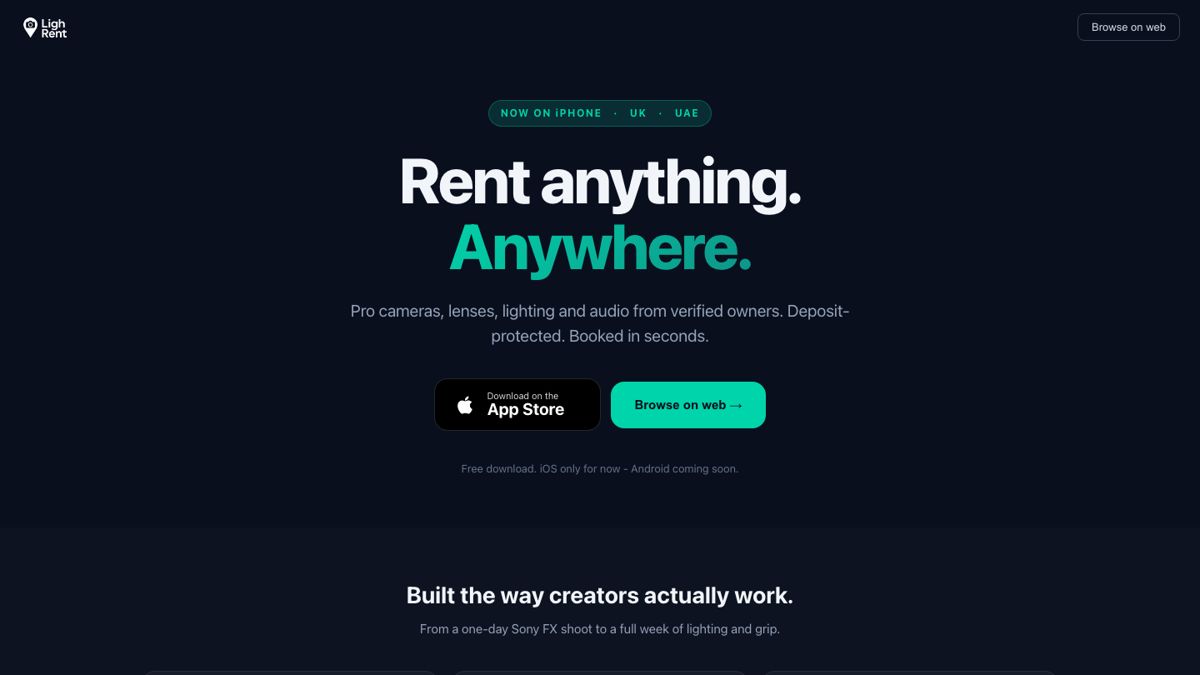
LighRent, on the web and on iPhone
01 · The problem
Why rental booking is harder than a shop
A shop sells an item once. A rental business lends the same item again and again, to people it has usually never met, and needs it back in the same condition. That changes everything a booking website has to do. It has to know when each item is free, decide who is allowed to rent it, record what was agreed, prove who collected it and when, and only then deal with payment and the deposit.
| Stage | The question the site must answer |
|---|---|
| Find | Is the right kit available, near me, on my dates? |
| Request | Does the owner want to rent to this person? |
| Verify | Is the renter who they say they are? |
| Agree | What exactly was rented, for how long, on what terms? |
| Hand over | Did the right person collect it, and when? |
| Pay and return | Is the payment taken and the deposit protected? |
02 · Finding kit
Search built around what, where and when

The homepage search asks three things: what you are after, where, and when.
The homepage leads with a single search bar in three parts, the item, the place and the dates, with quick searches underneath for the most common kit. Below it, category tiles cover everything a shoot needs, from cameras and lenses to grip, power, monitors, studios and spaces, and crew and creatives. A country switch at the top moves between the UK and the UAE, because the same marketplace serves London and Dubai with different listings and different words: people "hire" a camera in London and "rent" one in Dubai.
For search engines, the important pages are the ones that answer a real query. LighRent has category pages, brand pages such as Sony, ARRI and DJI, area pages such as camera hire in London and in Central London, and use-case pages such as kit for wedding videography, documentaries or podcasts. Listing and category pages are pre-rendered, so Google sees the real content rather than an empty app shell.

A local landing page: camera and film equipment hire in London, with the key areas listed.
03 · Booking flow
Request, approve, verify, then pay
LighRent works on requests. A renter picks dates and sends a request; the owner approves or declines; only then is the renter asked to pay. Approval first protects owners from bookings they cannot fulfil, and it means a renter is never charged for kit that turns out to be unavailable.
ID and live face check
Renters verify their identity with an ID document and a live face check, and owners can see the result on the booking.
Signed contract
The rental agreement is signed in the app. The signed contract card sits at the top of the booking with the ID photos, the signature and the key details.
Pickup check and handover code
Before collection the owner reviews the contract, runs a short checklist and confirms pickup, which sends the renter a handover code.
Card and Apple Pay
Once a booking is approved the renter pays by card or Apple Pay, with the deposit protected.
Owners also need a way to log bookings that happen outside the site. The supplier dashboard has a manual booking form with a Paste details button, which reads a copied message and fills in email, phone and name without overwriting anything already typed. On a phone the form has a fixed height, so the keyboard cannot make it jump, and it only closes with Cancel or the X, so a stray tap never loses a half-written booking.
04 · Mobile and app
Built for the phone first


The phone layout with its bottom tab bar, and the help centre on the same screen size.
Most renters arrive on a phone, often on set. The mobile site has a bottom tab bar (Home, Search, List, Bookings, Profile) and the same code runs the iPhone app, which was approved on the App Store on 2 October 2026. The app adds push notifications, so an owner hears about a request the moment it lands and a renter hears the moment the owner replies.
Wrapping a web app in a native shell has traps. One worth knowing: the browser's built-in prompt() dialog does nothing inside the iOS app, so every place that asked for a code that way had to move to an in-app dialog. Another: modern iPhone photos are large, and an upload limit set for older phones rejected them with a misleading "not logged in" error. The fix was to accept large uploads, compress them on the server, and never delete the originals.
05 · Support
A help centre people actually use

The help centre: one search box, popular questions, and topics from getting started to payouts.
Every question a renter emails about is a question the site failed to answer. The help centre has 36 step-by-step guides in seven topics, from getting started and renting gear to payments, verification, listing and delivery. Search tolerates typos and understands synonyms. Each guide has numbered steps you can tap, a "Do it now" button that takes you straight to the right screen in the app, related guides and a "Was this helpful?" vote. Bea, LighRent's AI assistant, sits beside the guides for anything they do not cover.

A guide with a short vertical video beside the steps.
The guides were written from the code itself, quoting the exact button labels, so the instructions match what people see. Short vertical tutorial videos sit next to the steps. If you are making those videos for your own product, real screen recordings beat animated mock-ups, and the advice in shooting vertical-first applies to help videos too.
06 · Lessons
What other rental businesses can copy
1. Approval before payment. For anything valuable, let the owner accept the renter first. It removes refunds for unavailable kit and gives the owner control.
2. Put the contract on the booking. The signed agreement, ID photos and handover code belong on one card, not in separate emails.
3. Render your content for Google. An audit in October 2026 found that LighRent's blog posts reached Google as an empty app shell, while the pre-rendered listing pages were fine. If your site is a single-page app, check what a crawler actually receives.
4. Give app reviewers a real path. Apple's reviewers have to reach every feature, including payment. If payment only appears after an owner approves a booking, the demo account needs an approved booking waiting, or the review stalls.
5. Answer questions before they are asked. A help centre with search, steps and short videos cuts support messages and builds trust with first-time renters.
The same thinking about real footage and honest product shots runs through product video for e-commerce, which is worth reading if your listings are your shop window.
More guides
Keep reading
FAQ
Common questions
What features does a rental booking website need?
Search by item, location and dates; real availability; a request and approval step; identity checks; a signed rental agreement; a record of handover and return; secure payment with a deposit; and clear help pages for renters and owners.
Should a rental website take payment before the owner approves?
For valuable equipment it usually works better to approve first and take payment second. The owner keeps control over who rents, and renters are never charged for kit that turns out to be unavailable.
How do you verify renters on a rental platform?
On LighRent renters complete an ID document and live face check, sign the rental agreement in the app, and receive a handover code only after the owner has reviewed the booking and confirmed pickup.
Can one codebase run a rental website and an iPhone app?
Yes. LighRent's website and iPhone app share the same code, with the app adding push notifications and Apple Pay. Test inside the app as well as the browser, because some browser features, such as prompt dialogs, behave differently there.
Written by Joshua Swain, who builds websites and booking systems and films for brands in London and Dubai. See the live platform at swainuk.com.